TECNOAMBASSADOR · PRESTASHOP MODULE
Tecno Destacados y Vendidos
Featured and best-selling products on your store's front page.
|
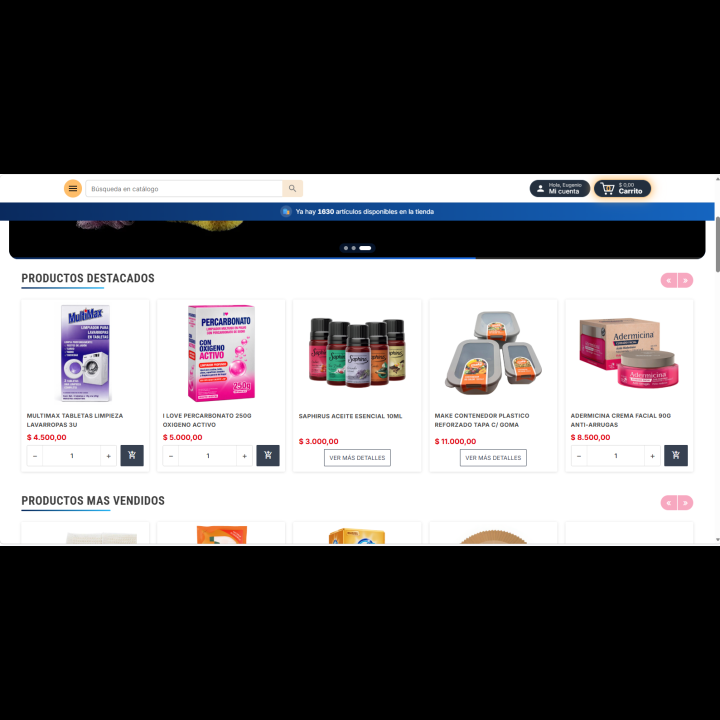
| Put your best products in sight the moment a customer walks in. Tecno Destacados y Vendidos adds two rows at the top of your store: Featured Products, which you choose by hand, and Best-Selling Products, which builds itself from your real sales. Products appear in random order and customers can buy without leaving the front page. |
| ⭐ Featured + 🔥 Best sellers 🛒 Direct purchase 🎬 7 animations |
What can you do?
|
| |
⭐ Featured products, chosen by you
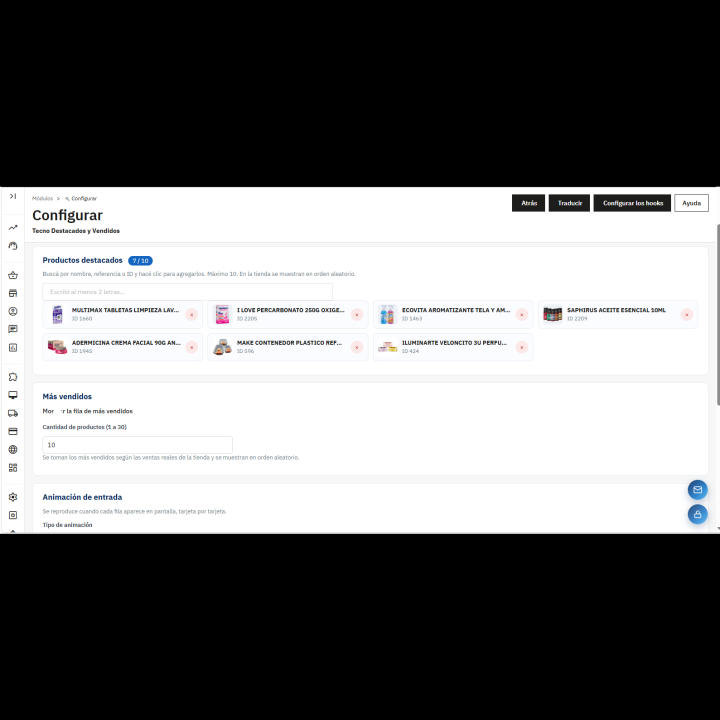
- Choose up to 10 products to highlight.
- Search in the panel: type at least 2 letters of the name, the reference or the product number, and it appears with its photo.
- Remove a product from the list with a single click.
- Products are shown in random order every time the page loads.
- If a product is deactivated or hidden from the catalog, it stops showing by itself.
|
|
| |
| |
🔥 Best sellers, based on real sales
- Builds itself from the products you sell the most, without you doing anything.
- Choose how many to show, from 1 to 30.
- Shown in random order so the row always looks different.
- Only active products visible in the catalog appear.
- You can show or hide this row with a switch.
|
|
| |
| |
🛒 Buy from the front page
- Each product shows its photo, name and price. If it has a discount, the previous price appears crossed out.
- Quantity selector with − and + buttons and an add to cart button.
- It is added without reloading the page and the cart updates instantly.
- If the product has combinations, customization or isn't available for order, a “View more details” button appears instead.
|
|
| |
| |
🎠 Adapts to any screen
- Shows 5, 4, 3 or 2 products per row depending on the available width.
- Arrows to move forward and back; at the end, it starts over.
- Swipe with your finger on phones.
- If all the products fit on screen, the arrows hide by themselves.
|
|
| |
| |
🎬 Entrance animations
- 7 options: no animation, fade in from below, zoom, slide from the left or from the right, 3D flip and bounce in.
- Plays when each row appears on screen, card by card.
- Button in the panel to replay the animation and see it before saving.
- Respects the visitor's reduced-motion setting on their device.
|
|
| |
| |
🎨 Texts and colors to your liking
- Your own title for each row (by default, “Featured products” and “Best-selling products”).
- Arrow color and price color.
- Side spacing, from 0 to 15% of the screen width.
|
|
| |
| |
⚙️ A control panel made to fit you
- Switch to show or hide the whole showcase in the store.
- Header with the status (active or inactive) and the module's brand.
- Shown in the store's top column (displayTopColumn), the only position where it can be placed.
- All settings in a single panel, with recommended values from installation.
|
|
| |
✅ Benefits
- Your best products in sight from the very first second.
- The best sellers row updates itself with your sales.
- Customers buy without leaving the front page.
- A showcase that looks different on every visit, thanks to random order.
|
| |
Requirements
- PrestaShop 1.7.6 or higher.
- A theme that shows the displayTopColumn position, which is where the showcase appears.
- The row titles use the Roboto Condensed typeface, which is loaded from Google Fonts.
|